Floral
Flowers aren't just for special occasions
Floral is a mobile app that allows users to create and order flower arrangements with just a few taps. Users can browse existing bouquets, create custom arrangements, and enjoy a seamless and personalized shopping experience. As the first project of my certificate, I focused on learning the basics of Figma, as well as the basics of UX designing in general.
Project Overview
Product
Floral is an app for users to order flowers with just a couple taps.
Timeline
November 2022 - July 2023
My Role
I was the sole researcher and designer on this project. I conducted all the user research, interviews, competitive audits, created personas, journey maps, and storyboards, and ran usability tests. I also designed all wireframes, prototypes, and mockups.
The Problem
Online flower shopping can be confusing and time-consuming due to complex interfaces, deterring many users from completing their purchases.
The Goal
Floral strives to simplify and enhance the flower shopping experience, making it user-friendly and accessible to all by ensuring a smooth and intuitive user journey tailored to diverse needs and preferences.
Understanding the User
User Research
For this case study, I conducted interviews with course-provided personas to uncover user needs, preferences, and pain points in online flower shopping. The interviews confirmed that users want a modern, clear, and easy-to-use product. One user group consists of individuals with busy schedules and limited time. Another critical finding was the importance of accessibility, particularly for users who struggle with English, highlighting a second user group: non-fluent English speakers.
Key Pain Points
Time : Ordering flowers online should not be time-consuming and energy-draining.
Language : Complex language and long sentences can be confusing and demanding for people who need to translate information.
Onboarding : A long and complicated setup process is demotivating for users, especially when information isn't saved if the user needs to complete it later.
User Flow : A user flow that is difficult to follow is frustrating. Users don't want to search extensively for important information.
Personas
When developing the personas and problem statements, I focused on identifying and understanding the primary user groups who would benefit most from an improved flower shopping experience.
I created the persona of Miranda, a busy neurosurgeon, to represent users with demanding schedules who need a quick and efficient ordering process.
Similarly, Amir's persona was crafted to highlight the challenges faced by non-native English speakers, emphasizing the need for clear, concise language and accessible design. These personas and their associated problem statements guided my design decisions, ensuring that the app addresses real user needs and pain points effectively.
User Journey Maps
Creating a journey map for my personas really helped build an idea of what was needed in the app; what features I was going to implement, how navigation was going to work, etc.
This process also helped empathize with the users because it linked personas to real issues and frustration they would encounter buying flowers online.
Competitive Audit
In addition to user research, I conducted a competitive audit of four online flower shops in Canada, including three direct and one indirect competitor, ranging from local boutiques to large companies. I evaluated their website and mobile experiences, interesting features, level of accessibility, user flow, navigation, visual design, brand identity, and content tone and descriptiveness.
After reviewing the audit results, I pinpointed key strengths and weaknesses among competitors and identified three major market gaps: lack of customization, insufficient accessibility features, and the absence of dedicated mobile apps. I leveraged these findings when creating the Floral app. I specifically added a feature where users could customize their entire bouquet, I made the app as accessible as I could with my current knowledge, and I am creating this app as a mobile app that can later be expanded to a web layout.
Audit Sheet
Design Process
Digital Wireframes
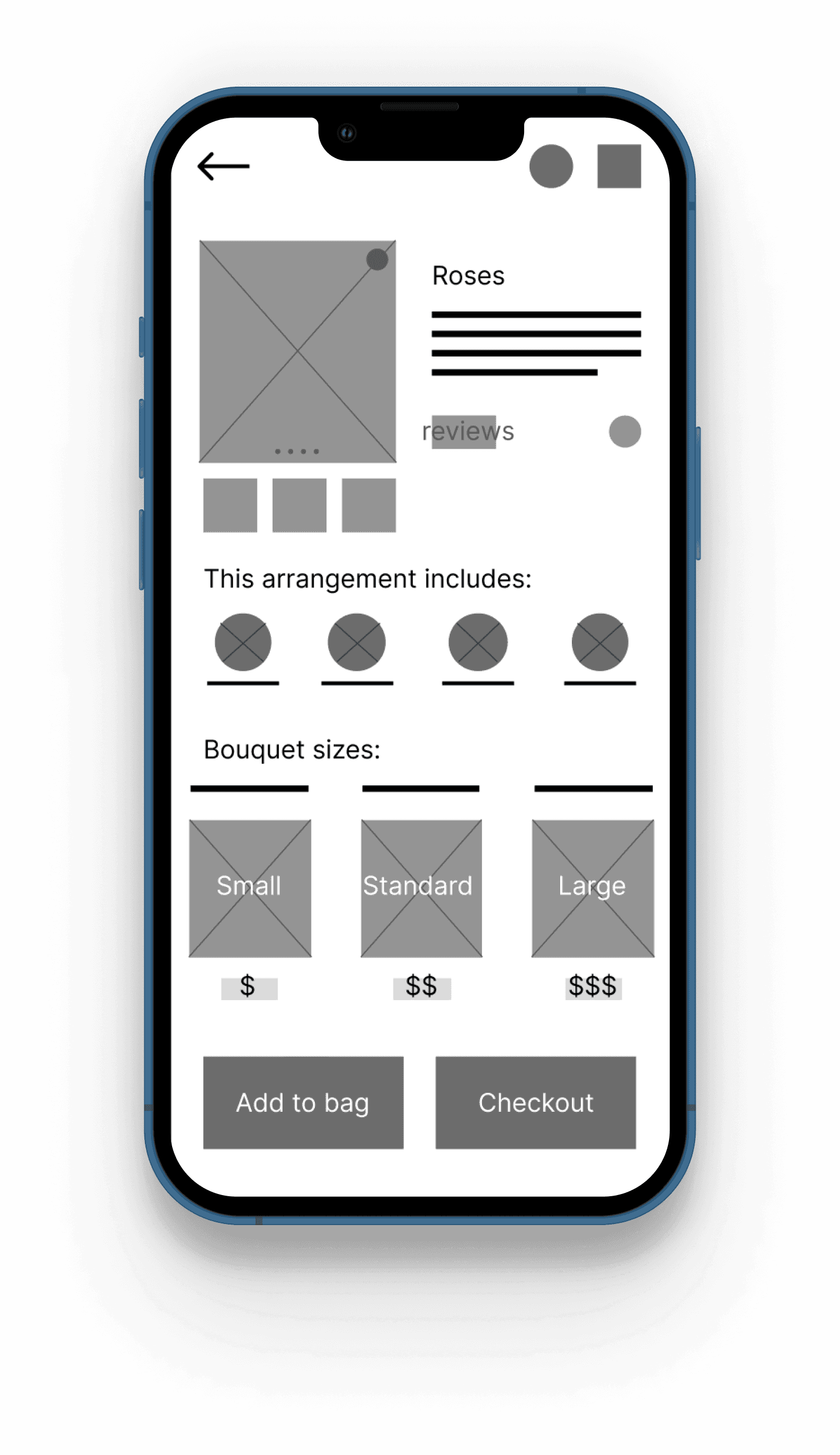
As the design process progressed, I finally used Figma for the first time!! I translated the paper wire frames into digital formats.
Creating these wire frames really made this first designing experience real for me since the ideas I had in my head were finally starting to look like an “actual” product.
Low-fidelity Prototypes
Usability Study #1
Here are the findings of the first usability study:
Users require simple and organized pages, especially when they contain important information.
the homepage needs to be accessible from any point within the app.
a more intuitive checkout process is necessary to improve the user experience.
Refining the Design
Mockups
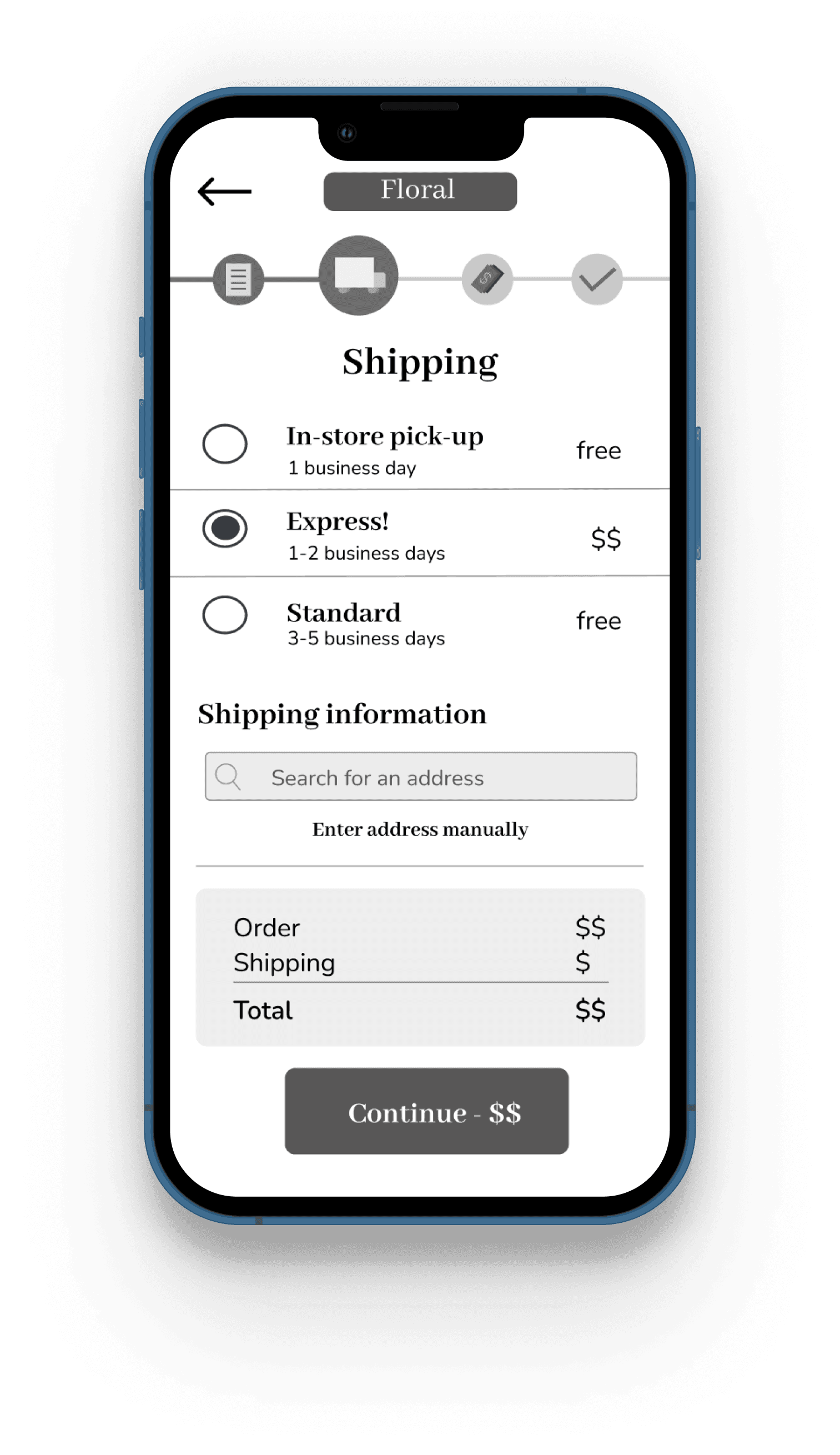
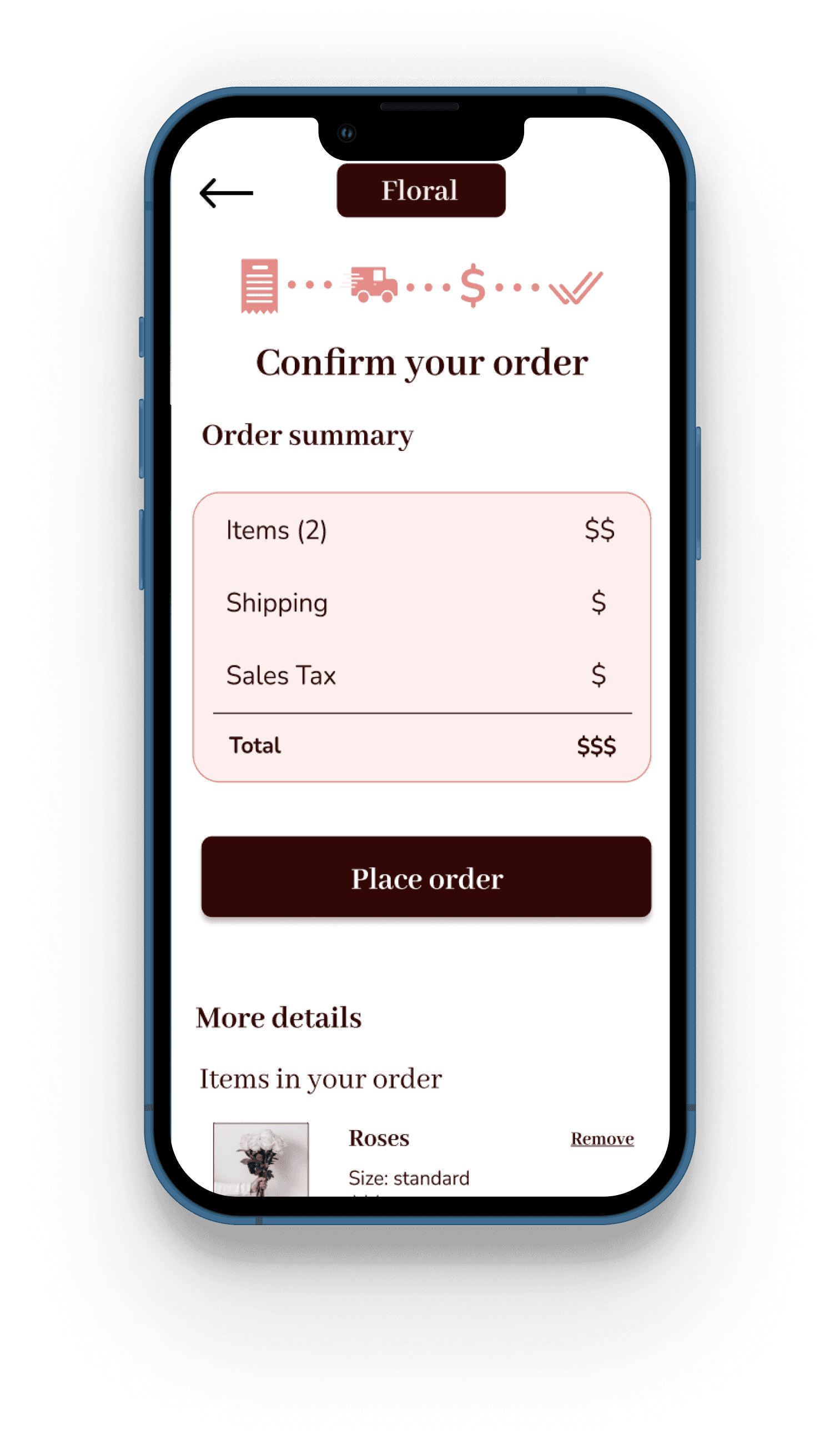
Early design concepts revealed a rather busy and overwhelming checkout process. Based on feedback from usability studies, I reorganized the layout and the process bar to create a more appealing and user-friendly design.
One significant improvement was the implementation of an intuitive search bar that autofills shipping information, eliminating the need for users to type out their entire address.
Usability Study #2
High-fidelity Prototype
Going Forward
Takeaways
Impact :
Floral’s design is time-saving, inclusive, and easy to use, transforming the flower shopping experience into an enjoyable and personalized process for users. By addressing key pain points and focusing on user-friendly features, Floral makes ordering flowers straightforward and efficient.
What I Learned :
Researching and designing this project underscored the importance of gathering user feedback throughout the design process. Engaging with users at various stages provided valuable insights that shaped the final product. Additionally, I learned the critical importance of inclusivity, ensuring the app is accessible and welcoming to all users.
Challenges : As my first project, this whole process was a challenge. Pushing my imagination to be innovative but keeping in mind I'm a beginner who still needs to learn the basics. Learning a new software as well as putting myself out there during the interviews and usability tests. Overall this was a great learning experience.
Nest Steps
Responsive Design : In the future, I plan to develop a responsive design for larger layouts, recognizing that not everyone has access to mobile phones. It is essential to adapt our product to all possible user scenarios, ensuring accessibility and usability across a wide range of devices.
Enhancing Accessibility : I realize there are still groups of people who might encounter difficulties with the app due to certain disabilities. As I gain experience and knowledge in making digital environments accessible to everyone, I am committed to implementing necessary changes.
UI Redesign : Reflecting on the current design with the experience I’ve gained, I recognize that there is room for improvement. A complete UI redesign is on the horizon to elevate the visual appeal and functionality of the app, ensuring it meets the highest standards of usability and aesthetics.
Paper Wireframes
To begin the design process, I created five versions of each screen in the form of paper wireframes. This iterative approach allowed me to explore different layouts and features to determine the best structure for each frame. When users view a specific flower arrangement, the layout I selected ensures that all important information is immediately visible.
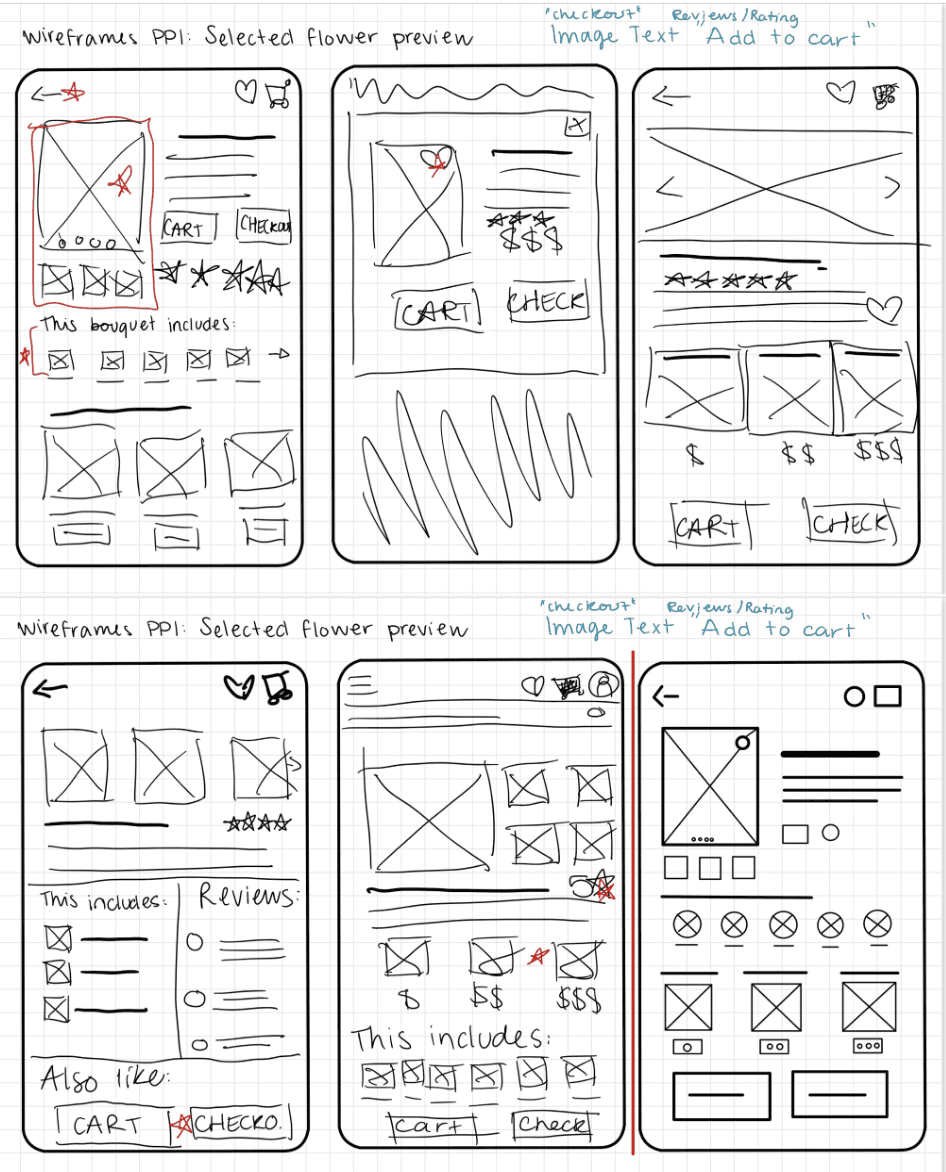
The images can be expanded by clicking on them for those who have difficulty seeing.
Simple descriptions with easy wording.
The “checkout” button is available at this stage for the user who needs to order quickly.

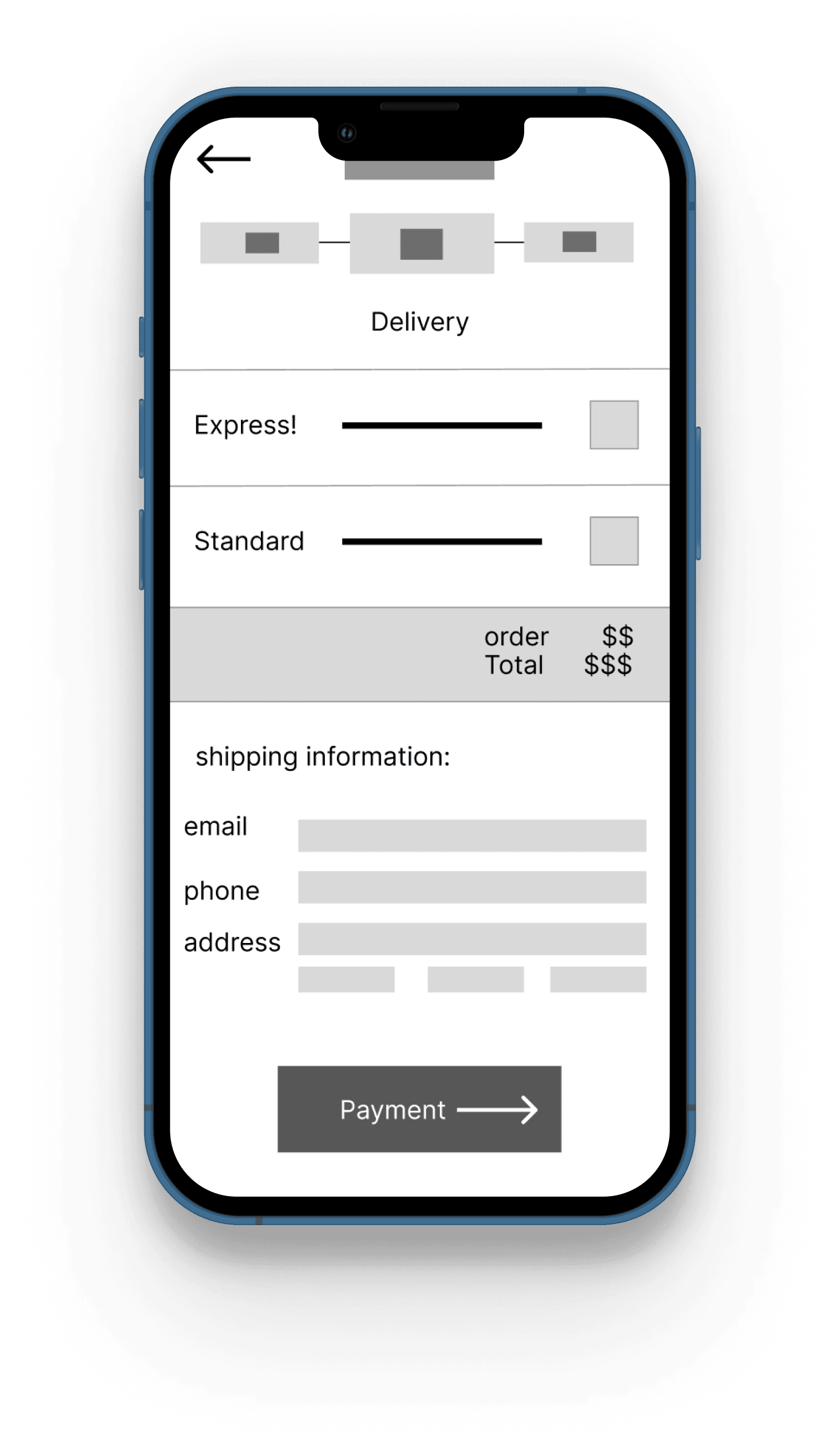
Before
After
Here are the findings of the second usability study:
Users appreciated the multiple paths available to achieve their goals.
Users found that there were too many shades of pink, which they found distracting.
The checkout process is now intuitive and foolproof.

Accessibility
My design prioritizes accessibility to ensure it is usable by people who aren't fluent in or don’t speak English. I would use simple language throughout the text areas and provide an option to change the app's language settings. Additionally, all images can be zoomed in when clicked, catering to users with visual impairments. The colours used in the design are all compliant with WCAG standards, ensuring sufficient contrast and readability for all users.
By incorporating these accessibility features, we aim to make the Floral app inclusive and user-friendly for a diverse audience.